Figure#
- class aastex.Figure(label, position=None, **kwargs)[source]#
Bases:
FigureAttributes
Start a new paragraph before this environment.
Start a new paragraph after this environment.
Determine whether or not to escape content of this class.
Return the name of the class used in LaTeX.
Set to true if this full container should be equivalent to an empty string if it has no content.
By default floats are positioned inside a separate paragraph.
Methods
__init__(label[, position])- param position:
Define the positioning of a floating environment, for instance
add_caption(caption)Add a caption to the float.
add_fig(fig, *args[, extension])Add a
matplotlib.Figureto the thisFigureadd_image(filename, *[, width, placement])Add an image to the figure.
add_plot(*args[, extension])Add the current Matplotlib plot to the figure.
append(item)S.append(value) -- append value to the end of the sequence
clear()copy()count(value)create(child)Add a LaTeX object to current container, context-manager style.
dump(file_w)Write the LaTeX representation of the class to a file.
dump_packages(file_w)Write the LaTeX representation of the packages to a file.
dumps()Represent the environment as a string in LaTeX syntax.
Create a string representation of the object as content.
dumps_content(**kwargs)Represent the container as a string in LaTeX syntax.
Represent the packages needed as a string in LaTeX syntax.
extend(other)S.extend(iterable) -- extend sequence by appending elements from the iterable
generate_tex(filepath)Generate a .tex file.
index(value, [start, [stop]])Raises ValueError if the value is not present.
insert(i, item)S.insert(index, value) -- insert value before index
pop([index])Raise IndexError if list is empty or index is out of range.
remove(item)S.remove(value) -- remove first occurrence of value.
reverse()S.reverse() -- reverse IN PLACE
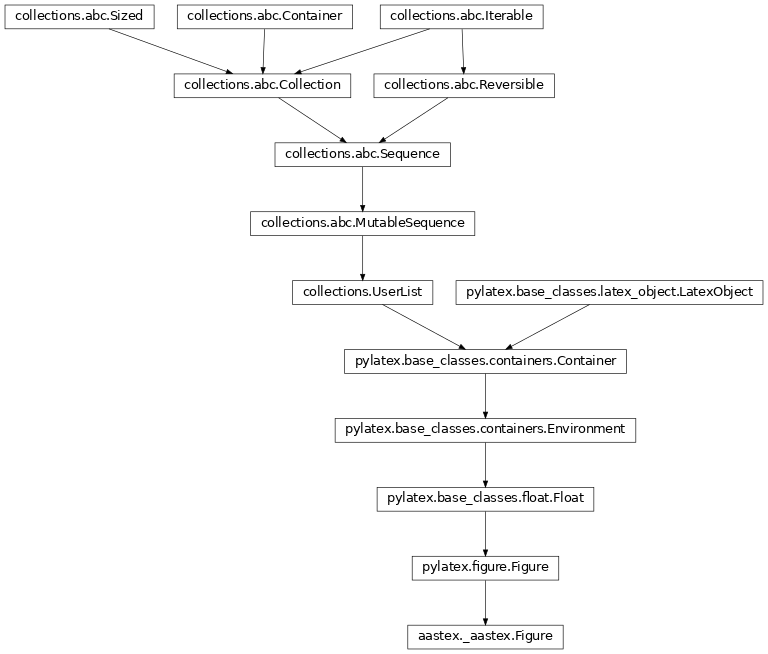
sort(*args, **kwds)Inheritance Diagram
- add_caption(caption)[source]#
Add a caption to the float.
- Parameters:
caption (str) – The text of the caption.
- Return type:
None
- add_fig(fig, *args, extension='pdf', **kwargs)[source]#
Add a
matplotlib.Figureto the thisFigure- Parameters:
fig (Figure) – matploblib figure to add to tis document
args – Arguments passed to plt.savefig for displaying the plot.
extension – extension of image file indicating figure file type
kwargs – Keyword arguments passed to plt.savefig for displaying the plot. In case these contain
widthorplacement, they will be used for the same purpose as in the add_image command. Namely the width and placement of the generated plot in the LaTeX document.
- add_image(filename, *, width=NoEscape(0.8\textwidth), placement=NoEscape(\centering))[source]#
Add an image to the figure.
- add_plot(*args, extension='pdf', **kwargs)[source]#
Add the current Matplotlib plot to the figure.
The plot that gets added is the one that would normally be shown when using
plt.show().- Parameters:
args – Arguments passed to plt.savefig for displaying the plot.
extension (str) – extension of image file indicating figure file type
kwargs – Keyword arguments passed to plt.savefig for displaying the plot. In case these contain
widthorplacement, they will be used for the same purpose as in the add_image command. Namely the width and placement of the generated plot in the LaTeX document.
- append(item)#
S.append(value) – append value to the end of the sequence
- clear() None -- remove all items from S#
- copy()#
- count(value) integer -- return number of occurrences of value#
- create(child)#
Add a LaTeX object to current container, context-manager style.
- Parameters:
child (~.Container) – An object to be added to the current container
- dump(file_w)#
Write the LaTeX representation of the class to a file.
- Parameters:
file_w (io.TextIOBase) – The file object in which to save the data
- dump_packages(file_w)#
Write the LaTeX representation of the packages to a file.
- Parameters:
file_w (io.TextIOBase) – The file object in which to save the data
- dumps()#
Represent the environment as a string in LaTeX syntax.
- Returns:
A LaTeX string representing the environment.
- Return type:
- dumps_as_content()#
Create a string representation of the object as content.
This is currently only used to add new lines before and after the output of the dumps function. These can be added or removed by changing the begin_paragraph, end_paragraph and separate_paragraph attributes of the class.
- dumps_content(**kwargs)#
Represent the container as a string in LaTeX syntax.
- Parameters:
**kwargs – Arguments that can be passed to ~.dumps_list
- Returns:
A LaTeX string representing the container
- Return type:
string
- dumps_packages()#
Represent the packages needed as a string in LaTeX syntax.
- Returns:
A LaTeX string representing the packages of the container
- Return type:
string
- extend(other)#
S.extend(iterable) – extend sequence by appending elements from the iterable
- generate_tex(filepath)#
Generate a .tex file.
- Parameters:
filepath (str) – The name of the file (without .tex)
- index(value[, start[, stop]]) integer -- return first index of value.#
Raises ValueError if the value is not present.
Supporting start and stop arguments is optional, but recommended.
- insert(i, item)#
S.insert(index, value) – insert value before index
- pop([index]) item -- remove and return item at index (default last).#
Raise IndexError if list is empty or index is out of range.
- remove(item)#
S.remove(value) – remove first occurrence of value. Raise ValueError if the value is not present.
- reverse()#
S.reverse() – reverse IN PLACE
- sort(*args, **kwds)#
- begin_paragraph = False#
Start a new paragraph before this environment.
- content_separator = '%\n'#
- end_paragraph = False#
Start a new paragraph after this environment.
- property escape#
Determine whether or not to escape content of this class.
This defaults to True for most classes.
- property latex_name#
Return the name of the class used in LaTeX.
It can be None when the class doesn’t have a name.
- marker_prefix = 'fig'#
- omit_if_empty = False#
Set to true if this full container should be equivalent to an empty string if it has no content.
- packages = OrderedSet()#
- separate_paragraph = True#
By default floats are positioned inside a separate paragraph. Setting this to option to False will change that.